전체 코드 : https://github.com/HyangRim/DirectX11-Engine-Client
GitHub - HyangRim/DirectX11-Engine-Client
Contribute to HyangRim/DirectX11-Engine-Client development by creating an account on GitHub.
github.com
Direct2D 텍스트 렌더링
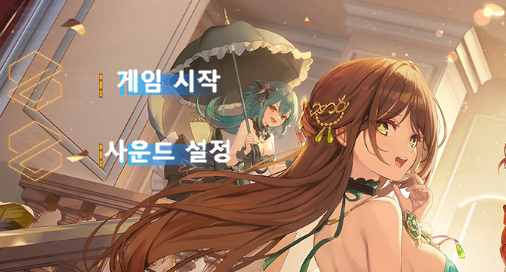
1. GDI 기반 텍스트의 한계
초기 구현에서는 Windows GDI를 사용한 텍스트 렌더링을 사용했었다.
// Text.cpp - GDI 기반 텍스트 렌더링
void Text::CreateTextTexture()
{
    // Windows GDI를 사용한 텍스트 렌더링
    HDC hdc = CreateCompatibleDC(NULL);

    // 폰트 생성
    HFONT hFont = CreateFont(
        fontHeight, 0, 0, 0, FW_BOLD, FALSE, FALSE, FALSE,
        DEFAULT_CHARSET, OUT_DEFAULT_PRECIS, CLIP_DEFAULT_PRECIS,
        CLEARTYPE_QUALITY, DEFAULT_PITCH | FF_DONTCARE,  // ClearType 시도했지만...
        m_fontName.c_str()
    );

    // 32비트 DIB 섹션 생성
    BITMAPINFO bmi = {};
    bmi.bmiHeader.biBitCount = 32;
    // ...

    // 단순한 TextOut 함수로 렌더링
    TextOut(hdc, textX, textY, m_text.c_str(), static_cast<int>(m_text.length()));
}
주요 문제점
- 안티앨리어싱 품질 저하 : GDI의 제한적인 텍스트 렌더링
- 픽셀 아티팩트 : 특히 작은 글꼴에서 계단 현상 발생
- 한글 렌덜이 품질 : 한글 폰트에서 가독성 저하
2. Direct2D 텍스트 렌더링 시스템
2.1 Direct2D + DirectWrite 도입
// D2DTextRenderer.cpp - Direct2D 기반 고품질 렌더링
bool D2DTextRenderer::Init()
{
    // D2D Factory 생성 (하드웨어 가속 지원)
    D2D1CreateFactory(D2D1_FACTORY_TYPE_SINGLE_THREADED, m_d2dFactory.GetAddressOf());

    // DirectWrite Factory 생성 (고급 타이포그래피)
    DWriteCreateFactory(DWRITE_FACTORY_TYPE_SHARED,
                       __uuidof(IDWriteFactory),
                       m_writeFactory.GetAddressOf());

    // WIC Factory 생성 (고품질 이미지 처리)
    CoCreateInstance(CLSID_WICImagingFactory, nullptr, CLSCTX_INPROC_SERVER,
                    IID_PPV_ARGS(m_wicFactory.GetAddressOf()));
}
2.2 텍스트 텍스쳐 생성 과정
텍스트를 DirectX 텍스쳐로 변환하는 핵심 로직
shared_ptr<Texture> D2DTextRenderer::CreateTextTexture(...)
{
    // DirectWrite TextLayout으로 정밀한 텍스트 측정
    ComPtr<IDWriteTextLayout> textLayout;
    m_writeFactory->CreateTextLayout(
        text.c_str(),
        static_cast<UINT32>(text.length()),
        textFormat.Get(),
        static_cast<float>(textWidth - padding * 2),
        static_cast<float>(textHeight - padding * 2),
        textLayout.GetAddressOf()
    );

    // 정확한 텍스트 메트릭 계산
    DWRITE_TEXT_METRICS metrics;
    textLayout->GetMetrics(&metrics);

    textWidth = static_cast<int>(ceil(metrics.width)) + padding * 2;
    textHeight = static_cast<int>(ceil(metrics.height)) + padding * 2;
}
2.3 하드웨어 가속 렌더링
// WIC 비트맵에 Direct2D로 직접 렌더링
ComPtr<ID2D1RenderTarget> renderTarget;
m_d2dFactory->CreateWicBitmapRenderTarget(wicBitmap.Get(), rtProps, renderTarget.GetAddressOf());

renderTarget->BeginDraw();
renderTarget->Clear(D2D1::ColorF(0, 0, 0, 0)); // 완벽한 투명 배경

// 고품질 외곽선 렌더링
if (outlineWidth > 0 && outlineBrush) {
    for (int x = -1; x <= 1; x++) {
        for (int y = -1; y <= 1; y++) {
            if (x == 0 && y == 0) continue;
            D2D1_POINT_2F outlineOrigin = D2D1::Point2F(
                origin.x + x * outlineWidth, origin.y + y * outlineWidth
            );
            renderTarget->DrawTextLayout(outlineOrigin, textLayout.Get(), outlineBrush.Get());
        }
    }
}

// 메인 텍스트 렌더링 (서브픽셀 정확도)
renderTarget->DrawTextLayout(origin, textLayout.Get(), textBrush.Get());
3. 셰이더 기반 아웃라인 텍스트 처리
3.1 텍스트 전용 셰이더 구현
Direct2D로 생성된 텍스쳐를 GPU에서 후처리하는 셰이더
#ifndef _TEXT_FX_
#define _TEXT_FX_

#include "00. Global.fx"

cbuffer TextMaterialBuffer
{
    float4 TextColor;
    float4 OutlineColor;
    float4 BackgroundColor;
    float TextAlpha;
    float OutlineWidth;
    float2 TextPadding;
};

struct PixelInput
{
    float4 position : SV_POSITION;
    float2 uv : TEXCOORD;
    float4 color : COLOR;
    float4 screenPos : TEXCOORD1; // 스크린 좌표 추가
};

float4 PS_OutlineText(PixelInput input) : SV_TARGET
{
    float2 uv = input.uv;

    // 텍스처에서 원본 색상 샘플링
    float4 texColor = DiffuseMap.Sample(LinearSampler, uv);

    // 텍셀 크기를 동적으로 계산
    float2 texelSize;
    DiffuseMap.GetDimensions(texelSize.x, texelSize.y);
    texelSize = (OutlineWidth / texelSize);

    // 8방향 외곽선 샘플링
    float outline = 0.0f;
    outline += DiffuseMap.Sample(LinearSampler, uv + float2(-texelSize.x, -texelSize.y)).a;
    outline += DiffuseMap.Sample(LinearSampler, uv + float2(0.0f, -texelSize.y)).a;
    outline += DiffuseMap.Sample(LinearSampler, uv + float2(texelSize.x, -texelSize.y)).a;
    outline += DiffuseMap.Sample(LinearSampler, uv + float2(-texelSize.x, 0.0f)).a;
    outline += DiffuseMap.Sample(LinearSampler, uv + float2(texelSize.x, 0.0f)).a;
    outline += DiffuseMap.Sample(LinearSampler, uv + float2(-texelSize.x, texelSize.y)).a;
    outline += DiffuseMap.Sample(LinearSampler, uv + float2(0.0f, texelSize.y)).a;
    outline += DiffuseMap.Sample(LinearSampler, uv + float2(texelSize.x, texelSize.y)).a;
    outline /= 8.0f;

    // 최종 색상 결정
    float4 finalColor;

    if (texColor.a > 0.5f)
    {
        // 텍스트 내부: 지정된 텍스트 색상 사용
        finalColor = input.color;
        finalColor.a *= texColor.a;
    }
    else if (outline > 0.1f)
    {
        // 외곽선 영역: 외곽선 색상 사용
        finalColor = OutlineColor;
        finalColor.a *= outline * TextAlpha;
    }
    else
    {
        discard;
    }

    return finalColor;
}

technique11 TextTech
{
    pass P0
    {
        SetBlendState(AlphaBlend, float4(0, 0, 0, 0), 0xFF);
        SetVertexShader(CompileShader(vs_5_0, VS_Text()));
        SetPixelShader(CompileShader(ps_5_0, PS_OutlineText()));
    }
}
#endif
4. 최적화 및 성능 고려사항
4.1 텍스쳐 캐싱
동일한 텍스트의 중복 생성을 방지
wstring D2DTextRenderer::GenerateCacheKey(const wstring& text, const wstring& fontName,
    float fontSize, const Vec4& textColor, TextAlignment alignment) const
{
    return text + L"_" + fontName + L"_" + to_wstring((int)fontSize) + L"_" +
        to_wstring((int)(textColor.x * 255)) + L"_" + to_wstring((int)alignment);
}

void D2DTextRenderer::ClearCache()
{
    s_textureCache.clear();
}
4.2 업데이트 최적화
// D2DText.cpp - 성능을 위한 지연 업데이트
void D2DText::Update()
{
    float currentTime = TIME->GetGameTime();

    // 지연된 업데이트 처리 (과도한 텍스트 변경 방지)
    if (m_hasPendingUpdate && (currentTime - m_lastUpdateTime) >= m_updateInterval) {
        m_text = m_pendingText;
        m_needUpdate = true;
        m_hasPendingUpdate = false;
        m_lastUpdateTime = currentTime;
    }

    // 필요한 경우에만 텍스처 재생성
    if (m_needUpdate) {
        CreateTextTexture();
        UpdateMaterial();
        m_needUpdate = false;
    }
}

void D2DText::SetTextDelayed(const wstring& text)
{
    // 즉시 업데이트 대신 지연 업데이트로 성능 향상
    if (m_text != text) {
        m_pendingText = text;
        m_hasPendingUpdate = true;
    }
}
5. 품질 비교

결론
- Direct2D 텍스트 렌더링
- 고품질 폰트 렌더링과 아웃라인 효과
- 효율적인 캐싱 시스템으로 최적화
'DirectX11 > Eternal Return 모작' 카테고리의 다른 글
| [DirectX 11 Eternal Return 모작] 18. Behavior Tree ( 행동 트리 ) (0) | 2026.01.07 |
|---|---|
| [DirectX 11 Eternal Return 모작] 17. QuadTree (0) | 2025.09.03 |
| [DirectX 11 Eternal Return 모작] 15. HUD와 상태바 (0) | 2025.09.03 |
| [DirectX 11 Eternal Return 모작] 14. UI (0) | 2025.09.03 |
| [DirectX 11 Eternal Return 모작] 13. 전투 , 데미지 시스템 (0) | 2025.09.03 |